
Why Your AI Chat "Forgets" Things: Tokens and Context Windows Explained
Your AI assistant hasn't stopped listening - it simply ran out of space. A no-jargon look at tokens and context windows, plus three habits that work around the ceiling.
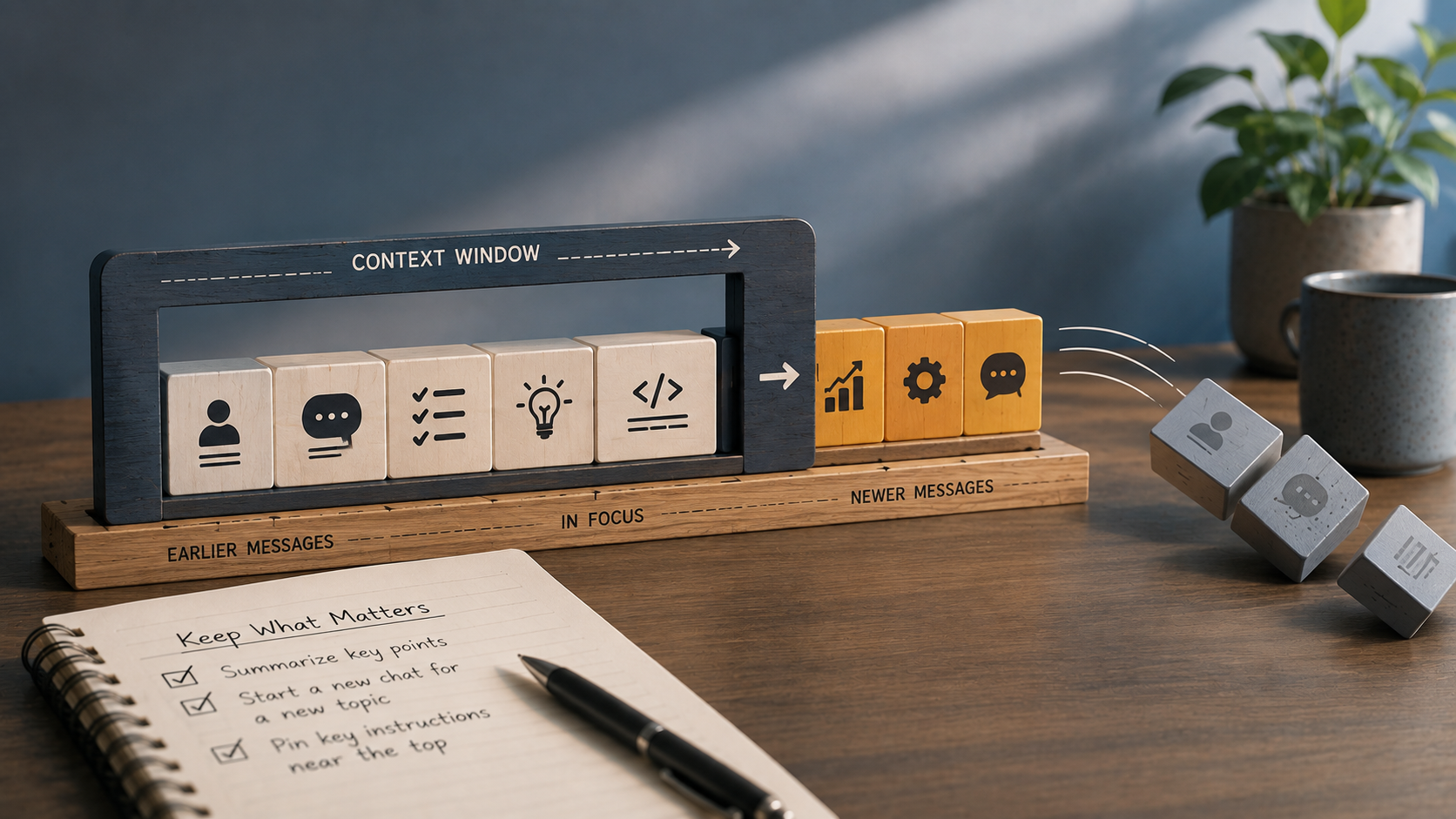
Key Takeaways
- A token is the tiny slice of text a model actually processes, one at a time - frequently smaller than a full word.
- A context window caps how much of that token history stays visible to the model at once. Push past it, and the earliest content silently drops off.
- Extra window space buys room, not focus - models are still known to gloss over the middle stretch of a long conversation, so a bigger cap doesn't guarantee better use of it.
About this app
Nearly anyone who's used an AI chatbot for more than a few sessions has run into this: you mention something upfront - your name, a formatting preference, an instruction like "keep answers under 100 words" - and by message twenty, the model has forgotten it existed. That's not carelessness on its part. There's a real, mechanical explanation underneath it, and once you understand it, a whole batch of odd chatbot behavior suddenly makes sense.
It Doesn't Remember - It Rereads Everything, Every Time
A chat model has no memory of your conversation the way a person does. Each time you press send, it starts over and rereads the entire thread from message one - everything you've written, everything it's written back - and only then produces a new reply. Nothing carries over between turns as a separate memory. The transcript itself *is* the memory, and the whole thing gets fed back in fresh with every message.
The Real Unit of Work: Tokens
Before that rereading can happen at all, your text gets sliced into tokens - pieces generally smaller than a whole word. A word like "understanding" might split into two or three fragments, while short, common words tend to survive intact. As a loose rule of thumb, 100 English words works out to roughly 130-150 tokens. Every model also has a strict cap on how many tokens it can handle in a single exchange, prompt and answer combined.
The Cap Has a Name: the Context Window
That cap is what people mean by the context window. The moment your ongoing conversation - all prior messages plus the new one you're sending - exceeds it, something must be cut. Most tools handle this behind the scenes by trimming the oldest messages first, and that's precisely the moment your earlier instruction ceases to exist as far as the model is concerned.
A Bigger Window Isn't a Complete Fix
Each new model generation arrives with a roomier context window, and that does help - but it's not a clean solution, for three reasons that compound on each other. More tokens means more cost and more time to process. Models measurably struggle to weigh information buried in the *middle* of a long context compared to the start or end - sometimes called the "lost in the middle" problem. And a larger window just means more old, potentially irrelevant material still technically in play, which can drag the model's attention off course rather than sitting there inert.
| Model tier (illustrative) | Where it's comfortable | Where the limit starts to bite |
|---|---|---|
| Small / lightweight | Quick, single-topic questions | Long back-and-forth or pasted documents |
| Mid-range | Most everyday chat and writing help | Very long documents, multi-hour sessions |
| Large-context | Long documents, multi-file code review | Cost and speed, even when the cap itself isn't reached |
I'm skipping exact figures in that table on purpose. Context-window sizes get revised with almost every new model release, so a specific number written today would be outdated within months - go check the vendor's current documentation if you need a real figure to plan around.
The Habits That Actually Make a Difference
Three habits handle most of the problem. Recap periodically during a long chat - have the model summarize the key decisions made so far, and keep that summary ready to paste back in if things drift. Open a new chat once the subject genuinely shifts, rather than dragging an unrelated question into a thread that's already spending its context on something else. And place anything truly important near the top of your prompt instead of burying it deep in the conversation, since the model tends to weigh content at the edges of the window more reliably than whatever sits in the middle.
This isn't really something to be annoyed by - it's a limit, no different from a phone's battery life or a spreadsheet's row cap. Once you know where the edge sits, it stops catching you off guard.
A Mental Picture That Makes It Click
Picture a desk that only fits so much paper. Each message you send adds a fresh page to the pile, and the model can only see whatever's currently sitting on the desk - nothing tucked in a drawer, nothing recalled from yesterday. Once the pile gets too high, the oldest sheets get quietly pushed off the back to make space for new ones. That's the entire mechanism. No drawer, no archive, no long-term memory behind the desk - unless the specific product you're using has bolted one on separately (some chat tools now save facts about you outside the raw conversation, but that's an added feature, not how the base model itself operates).
Why Pasted Documents Make This Especially Obvious
This shows up clearly the moment you paste a long document into a chat and start asking about it. That document alone consumes a big share of the available window right on the first message, leaving far less room for the conversation that follows. Fire off ten questions about a lengthy contract, and by question eight the model might be working from a version of that document that's already partly slid off the desk - even though everything looked fine back at question two. When that happens, the quickest fix is usually re-pasting the relevant section rather than assuming the model still has the whole thing in view.
Frequently Asked Questions
Does a larger context window automatically mean smarter replies?
Not really. Having more room to hold information isn't the same skill as reasoning well over it - a model with a massive window can still skim past something buried in the middle of a long document.
Why does an AI sometimes contradict itself within the same conversation?
Usually one of two things is happening: either the earlier message already dropped out of the active window, or the model is simply prioritizing a newer instruction over an older, conflicting one it technically can still see.