
Taming Your AI Inbox Without Losing Track of What Matters
AI email tools promise to tame your inbox for you. Here's a realistic look at what actually works for triage and drafting, plus the one habit that keeps you from losing important context along the way.
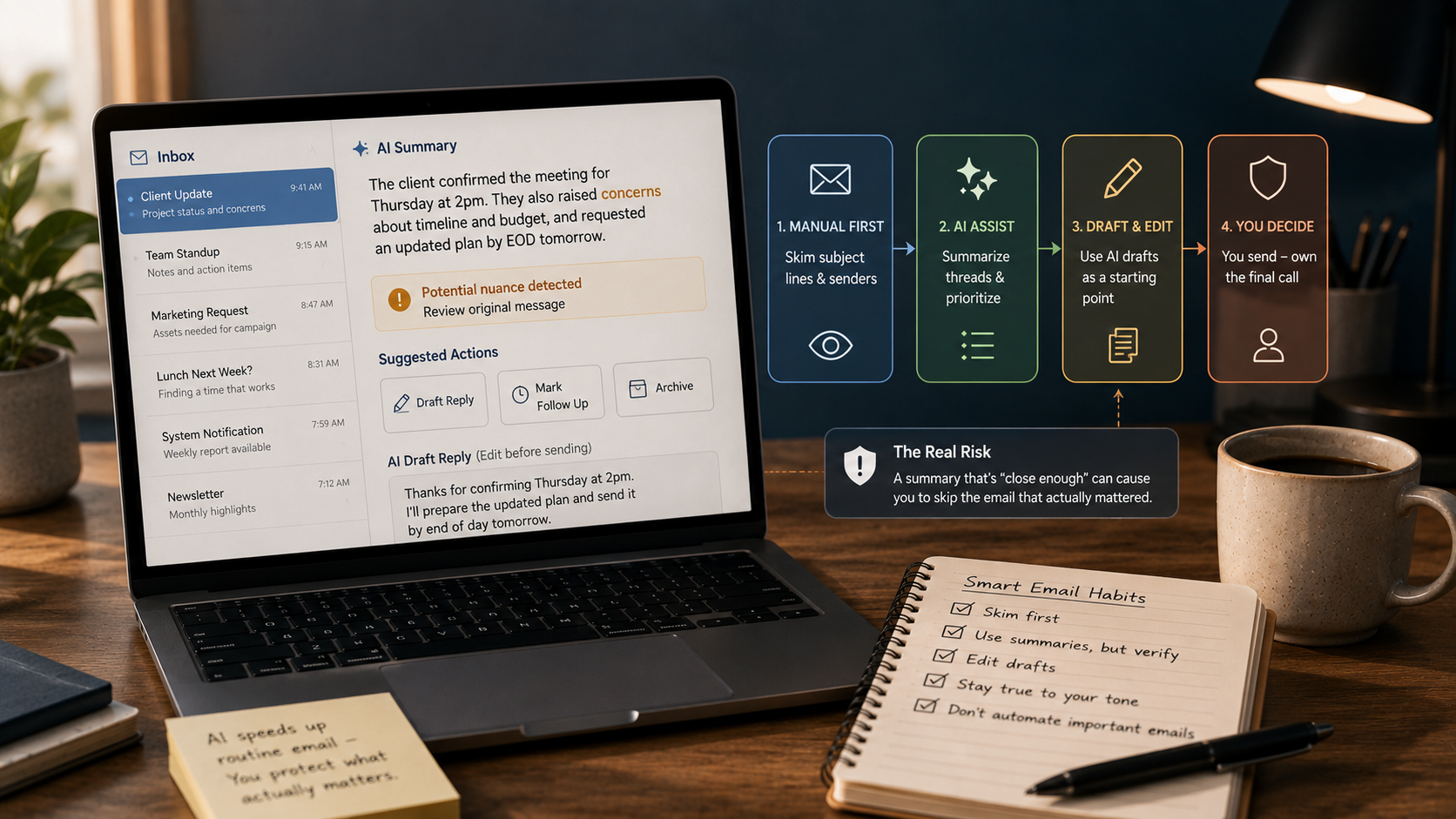
Key Takeaways
- AI email tools are strongest at compressing long threads and knocking out routine replies - they're weakest at judging which messages genuinely need your personal attention.
- The real danger isn't a clumsy AI-written reply. It's a "close enough" summary that convinces you to skip the one email that actually needed your full attention.
- A fast manual scan of subject lines - done in parallel with AI summarization, not instead of it - catches most of what a summary alone would miss, and it only takes seconds.
About this app
A drowning inbox is one of the first places people reach for AI relief, and it genuinely does take some of the sting out of the grind. There's one specific way it can quietly backfire, though, and it's worth flagging up front: a summary that's "close enough" can talk you out of ever opening the one email that actually needed your full attention.
Where these tools genuinely pull their weight
Three things these tools genuinely do well: reduce a twenty-message back-and-forth to a few sentences on what was actually decided, write routine replies where the content is largely predictable (a scheduling confirmation, a standard information request, a polite no), and flag messages matching patterns you've taught it to treat as urgent or low-priority.
- Thread summarization: Boils a sprawling back-and-forth down to a few sentences on what actually got decided, saving you the re-read.
- Routine drafting: Turns out predictable replies - scheduling confirmations, standard information requests, polite declines - fast and competently.
- Pattern-based flagging: Learns which senders or subject patterns you treat as urgent or low-priority and sorts messages accordingly.
- Follow-up reminders: Flags threads that went quiet and probably need a nudge - exactly the kind of thing that slips through the cracks on your own.
Where the actual risk lives
The failure mode here isn't a poorly written AI reply - it's trusting a generated summary so much that you skip the original message, which happened to contain something nuanced the summary flattened out. "Client confirmed the meeting" can be sitting right on top of a sentence expressing real concern, three paragraphs down where the summary never looked.
Summarization exists to compress, and compressing always means choosing what to cut. Most of what gets dropped genuinely is filler - pleasantries, repeated context, logistics said twice. Every once in a while, though, the cut sentence is the one that changes the entire meaning of the email, and nothing in a summary flags where its own blind spots are.
A near-free habit that catches almost everything
The fix barely costs anything: make a fast manual scan of subject lines and senders your actual first move, running it alongside AI summarization rather than after it. It takes seconds and reliably catches anything that clearly needs your full attention before you lean on a summary for the rest. Treat AI summaries as a way to blast through routine volume faster - not as a stand-in for actually noticing what matters.
- Scan subjects and senders first: A five-second look at the raw inbox before you open any summary tool catches obvious priority items that a compression pass might paper over.
- Let summaries take the volume, not the judgment: AI should shoulder the bulk of routine reading; deciding what's genuinely important stays your job.
- Spot-check summaries from senders who matter: For threads from clients, managers, or anyone whose messages carry weight, open the original occasionally to see just how much the summary is actually dropping.
- Don't archive off a summary alone: Filing something away based only on the compressed version means you've lost any later chance of catching what it missed.
Keeping AI-written replies from sounding like nobody
Treat AI-drafted replies as a starting point for editing, not a finished product to fire off unchanged - especially anything that touches a relationship, a negotiation, or a decision. Genuinely routine acknowledgments are fine to send with a light touch-up or none at all. Watch for a tone that doesn't sound like you, though - people close to you will notice faster than you'd think.
| Type of email | OK to send the AI draft largely untouched? | What to verify first |
|---|---|---|
| A scheduling confirmation | Yes | The date, time, and time zone are correct |
| A standard information request | Yes | The facts are accurate and nothing is overstated |
| A polite decline | Usually | Tone matches how you'd actually phrase it |
| A client or manager reply | No | Read the full original thread before touching the draft |
| A negotiation or disagreement | No | Rewrite it substantially - AI tends to flatten nuance and stakes |
None of this is a knock on AI inbox tools - for most people, they genuinely cut hours off a week spent drowning in email. What actually makes the difference is one small habit: give the raw inbox your own eyes for a few seconds before you trust the compressed version, and treat any AI draft that touches a real relationship as a starting point, not a finished product. That one habit is what separates faster email from riskier email.
Setting Rules Around Risk, Not Just Volume
Most people configure AI inbox rules purely around volume - archive the newsletters, flag anything from the boss - and stop there. A stronger setup adds one more layer: specific senders or subject patterns that never get fully summarized or auto-filed, regardless of how routine they look. Legal notices, anything referencing a contract or deadline, and a short list of people whose messages have mattered before deserve to be carved out from automatic handling entirely - that way the tool races through the 90% of email that's genuinely low-stakes and never lays a hand on the 10% where a missed nuance actually costs you.
One Habit Worth Keeping Every Week
- Review your exception list monthly: which senders and topics deserve manual attention shifts as projects and relationships change, so a list you set once and forget goes stale fast.
- Spot-check one AI-filed thread every week: pick one at random that the tool handled on its own and read the full original, just to catch any drift in how aggressively it's summarizing or filtering before that drift becomes invisible.
- Pay attention to what slipped through, not just what got caught: the signal worth tracking is the rare case where a summary actually misled you, not the routine case where everything went fine.
Frequently Asked Questions
Can an AI email tool fire off a reply on its own, without me reviewing it first?
It depends on the tool and how it's set up - most default to draft-and-review, though some offer a fully automated send mode. Worth double-checking which mode you're actually running, especially for anything that's hard to walk back once it's sent.
What's the single biggest mistake people make using these tools?
Trusting a summary enough to skip the original on a message that actually mattered. Whatever time you claw back on routine email isn't worth the risk on the one message that needed your full attention.