
Stuck Ordering Dinner in a Language You Don't Speak? Here's What Actually Gets You Through It
AI Live Voice Translator covers spoken, written, camera, and document translation in one app - a look at which mode actually works for which real-world moment, from a restaurant menu to a contract.
Key Takeaways
- Camera mode is the fastest way to translate anything written - a menu, sign, or form - without typing a word.
- Live conversation mode listens to both sides of a real back-and-forth, but works best for short, specific exchanges rather than long, complex conversations.
- Document mode handles a full lease, contract, or letter at once instead of pasting text in line by line.
- It's a very new listing with single-digit installs and no public rating history yet, so it's worth trying with that context in mind.
Get this app
About this app
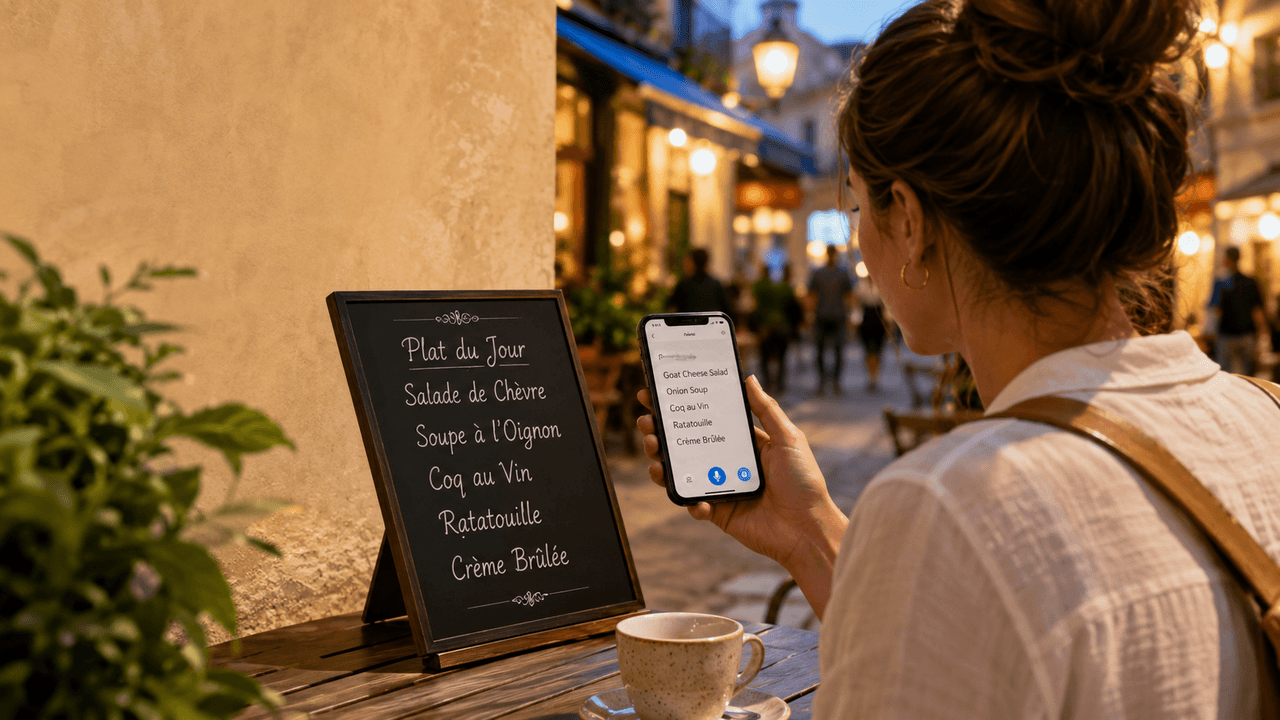
There's a specific kind of panic that hits about ten seconds after a waiter hands you a menu you can't read. Pointing and hoping is one option. Pulling up a translation app mid-table is the other, and increasingly, that's the one people actually reach for. That's the moment this kind of app is built around - not a language-learning session, just getting through the next five minutes.
AI Live Voice Translator is built around that exact category of moment, and it's worth looking at less as a feature list and more as a set of tools for specific situations, because that's really how an app like this gets used.
The menu, the taxi, the hotel desk: camera and text translation
For anything written - a menu, a street sign, a hotel form - the camera translator is the fastest path. Point the phone, and text on the page gets translated without any typing. For messages, emails, or anything you'd rather paste than photograph, there's a straightforward text-translation mode too. Neither is glamorous, but they cover the bulk of what actually comes up while traveling: reading something quickly, not holding a conversation.
The actual conversation: two-way live mode
The harder problem is a real back-and-forth - haggling at a market, asking a pharmacist a question, chatting with a host family. The app's live conversation mode is built for exactly that: it listens to both sides of a conversation and translates on the fly, aiming to keep things moving without long, awkward pauses between turns. This is the feature worth testing before you actually need it, because live spoken translation is the hardest translation problem there is. Background noise, heavy accents, and fast speech all still trip up voice translation tools generally, this one included by nature of the task. It's genuinely useful, but "the pharmacist compares two dosages" is a fairer expectation than "a flowing thirty-minute conversation with zero friction."
The paperwork: document and PDF translation
Less flashy, more practically valuable for a lot of users: the ability to upload a document or PDF and get the whole thing translated. A lease, a contract, a letter from a school - anything you'd otherwise need to paste line-by-line into a translator benefits from being handled as a full file instead.
A fifth mode worth knowing about: one-off spoken translation
Separate from the two-way conversation mode is a simpler spoken-translation option: say a single phrase or sentence, and get it translated back as text or audio without opening a full back-and-forth conversation. It's a smaller, more targeted tool than live conversation mode - useful for something like recording a quick translated voice note to send ahead, or getting one specific phrase right before saying it out loud, rather than running an entire exchange through the app in real time.
Who this is actually built for
The app is aimed less at any one type of user and more at three overlapping groups: travelers who need to get through ordinary moments in an unfamiliar language, students working through coursework or communicating with classmates in a different language, and business users who need a document translated correctly or want to sound competent on a call with an overseas contact. The five modes map fairly directly onto those three groups - camera and spoken translation lean toward travel, document translation leans toward students and business use, and live conversation mode cuts across all three.
Where this fits, realistically
- Reading a menu, sign, or form on the fly - camera mode
- A real conversation with someone who doesn't share your language - live conversation mode
- A document, contract, or letter you need translated in full - document mode
- A message, email, or anything typed - text mode
Worth knowing before you rely on it
This is a newer listing - install numbers are still in the single digits and there's no public rating history yet, so it hasn't built up the kind of track record some of the more established translation apps have. It also carries ads and in-app purchases, which is standard for the category but worth going in aware of. None of that makes it a bad tool; it just means treating it as a capable option to try rather than a proven daily-driver replacement for whatever you're already using, at least for now.
Ads and in-app purchases are standard across nearly every free translation app on the market, not a mark against this one specifically - the more relevant differentiator is whether the five modes actually cover the moment you need them for, which is the practical test worth running before trusting it on a trip that matters. The lowest-risk way to find that out is to try it before it matters - test the camera mode on a menu at a local restaurant, or run the live conversation mode with a friend speaking a different language, rather than trusting it for the first time in the middle of an actual trip.
The honest takeaway: no translation app, including this one, is going to make language disappear as a barrier entirely - accents, slang, and fast speech will always be the hard edge case. But for the specific, ordinary moments travel and daily life throw at you - the menu, the taxi, the form at the counter - having one app that covers voice, text, camera, and documents in a single place beats juggling three different tools for three different jobs.
Frequently Asked Questions
Which mode should I use for a menu or street sign?
Camera mode is built for exactly that - point the phone at the text and it translates what's on the page without any typing, which is faster than switching to text mode for anything you can just photograph.
Can I trust the live conversation mode for a long, detailed discussion?
It's built to translate a real back-and-forth in real time, but like any live spoken translation tool, background noise, heavy accents, and fast speech can trip it up. It's better suited to short, specific exchanges than a lengthy, complex conversation.