
A Simple Day-by-Day Blueprint for Working With AI
This isn't a scattered list of tips - it's a complete, realistic daily workflow that shows exactly where AI fits in, from planning your morning to wrapping up at night.
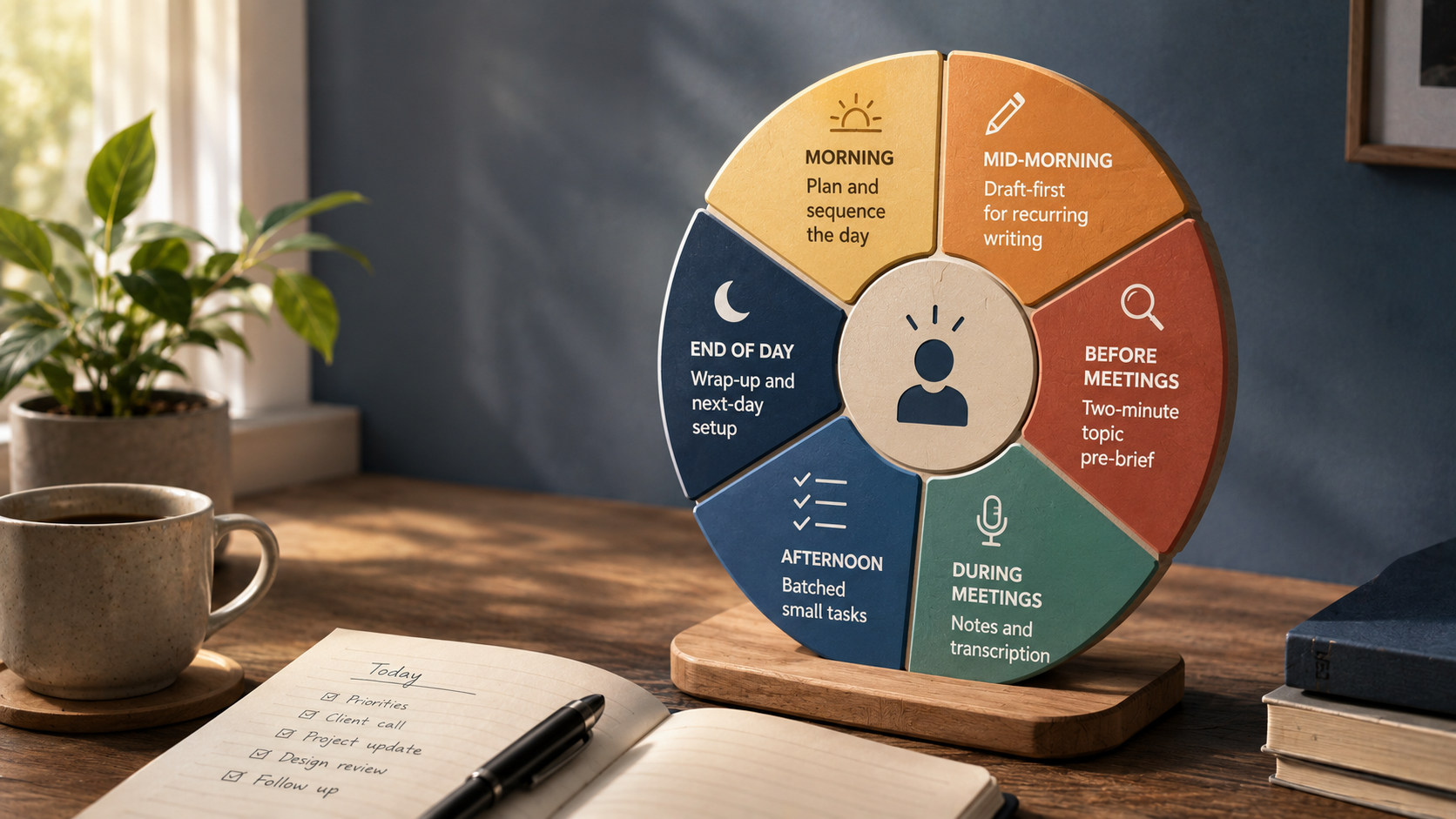
Key Takeaways
- A workflow that actually holds up uses AI at a handful of specific, recurring moments in the day - not as a constant background presence running under everything.
- Morning planning and the end-of-day wrap-up are two of the highest-value, lowest-risk places to begin.
- Build it one habit at a time - trying to adopt every touchpoint at once tends to feel like learning a new system instead of actually saving time.
About this app
Individual tips are handy on their own, but they get much easier to actually adopt once you see how they fit together across a real day. Treat what's below as a starting template to shape around your own work, not a rigid schedule to follow to the letter. The goal isn't handing your entire workday over to an assistant - it's spotting the handful of moments where a few minutes of AI help clears real friction, then stringing those moments together into something that survives a Tuesday with three meetings and a deadline, not just a quiet day.
Morning: turning a messy list into a workable plan
Mornings are worth five to ten minutes: give an assistant your task list, calendar, and rough priorities, and ask it to help sequence the day in a realistic way - what needs to happen first, what can slide, what looks over-scheduled. This is genuinely low-risk, high-value territory, since you're organizing information you already possess rather than asking the assistant to make judgment calls on your behalf. A useful version of this prompt spells out your real constraints - fixed meeting times, a hard deadline, when your energy actually peaks during the day - rather than just dumping a raw list and hoping it works out.
- Fixed commitments: meetings and calls that can't be moved, listed with their real times.
- Actual deadlines: what genuinely has to ship today, as opposed to what just feels urgent.
- Energy pattern: whether your focused work is stronger in the morning or after lunch, so the demanding tasks land in the right window.
- Buffer time: asking explicitly for gaps between blocks rather than a plan that assumes nothing will ever slip.
Mid-morning and before meetings: draft first, brief fast
By mid-morning, apply draft-first to whatever routine writing has come up - status updates, standard emails, documentation - instead of starting from a blank page every time. The point isn't that the first draft comes out perfect; it's that editing something imperfect is a fundamentally easier task than generating it from nothing, and that gap adds up across a dozen small writing tasks in a week. Ahead of any meeting on unfamiliar territory, take two minutes to get the core concept explained in plain language first - a fast pre-brief on an unfamiliar acronym, system, or client history means you walk in able to follow along instead of quietly falling behind in the first five minutes.
In the meeting itself: stay engaged, let the record run quietly
During the meeting, let AI take care of transcription and the general summary while you actually stay engaged in the conversation - but keep restating decisions and action-item owners out loud, which sharpens both the AI's record and your own memory of what happened. This one habit matters more than it might sound like it should: a summary built from a transcript where nobody ever said "so, to confirm, Sarah owns the follow-up by Friday" out loud tends to come out vaguer and harder to act on than one where the decisions were spoken plainly.
Afternoon: batch it, don't let it trickle
In the afternoon, group small similar tasks into a single block rather than dealing with them one by one as they trickle in throughout the day - that removes the repeated cost of stopping and restarting the same kind of work. Knocking out ten short emails back to back with an assistant drafting replies is faster, per email, than answering them as they land in between other tasks, since you're not paying the mental setup cost of switching context ten separate times.
End of day: setting up tomorrow before you log off
And at day's end, turn your scattered notes into a short structured wrap-up and flag whatever's unfinished for tomorrow's planning step - that closes the loop on the morning habit and means tomorrow begins from an organized handoff rather than a blank page. This is a quick exercise, not a full report: a few bullet points on what got finished, what didn't, and what needs attention first thing tomorrow is enough to make the next morning's planning faster and more accurate.
The whole day, at a glance
| Time of day | AI touchpoint | What it saves |
|---|---|---|
| Morning | Planning and sequencing the day | Time spent manually re-sorting a messy task list |
| Mid-morning | Draft-first for recurring writing | The blank-page drag on routine writing |
| Before meetings | A two-minute topic pre-brief | Feeling lost or asking basic questions mid-meeting |
| During meetings | Note-taking and transcription | Manual note-taking while trying to stay engaged |
| Afternoon | Batching small tasks | The repeated cost of context-switching |
| End of day | Wrap-up and setup for tomorrow | A slow, blank-page start the next morning |
Rolling this out without it feeling like a whole new system
Trying to adopt all six touchpoints on day one tends to feel like learning a new system rather than saving any time. A more lasting approach builds the habit in stages.
- Week one: pick the single touchpoint that matches your biggest daily friction point - for most people, that's morning planning or the end-of-day wrap-up - and run just that one until it becomes automatic.
- Week two: layer in draft-first for routine writing once the first habit has stopped requiring conscious effort.
- Week three: add meeting transcription and pre-briefs if your calendar is genuinely meeting-heavy; skip it completely if it isn't.
- Week four: bring in afternoon batching last, since it depends on already knowing which small tasks tend to pile up during your day.
Pick the one or two touchpoints that line up most directly with your actual friction points, get those running on autopilot, and only then add more. A workflow built around three habits you genuinely use every day beats one built around six that you abandon within a week.
Frequently Asked Questions
Do I need multiple AI tools to make this workflow work?
No - a single general-purpose assistant handles planning, drafting, and pre-briefing. Meeting-notes transcription usually calls for its own dedicated tool, but everything else here runs fine on one general assistant.
What if my job doesn't fit this exact daily shape?
Treat it as a template rather than a script - swap in touchpoints that match your own recurring friction points and drop whatever doesn't apply to you. The underlying idea, a small number of specific repeated AI touchpoints, matters far more than following this exact schedule.