
Your First LLM API Call, Explained Piece by Piece
What actually happens under the hood the first time you hit an LLM API - the request body, the response you get back, and the slip-ups beginners run into again and again.
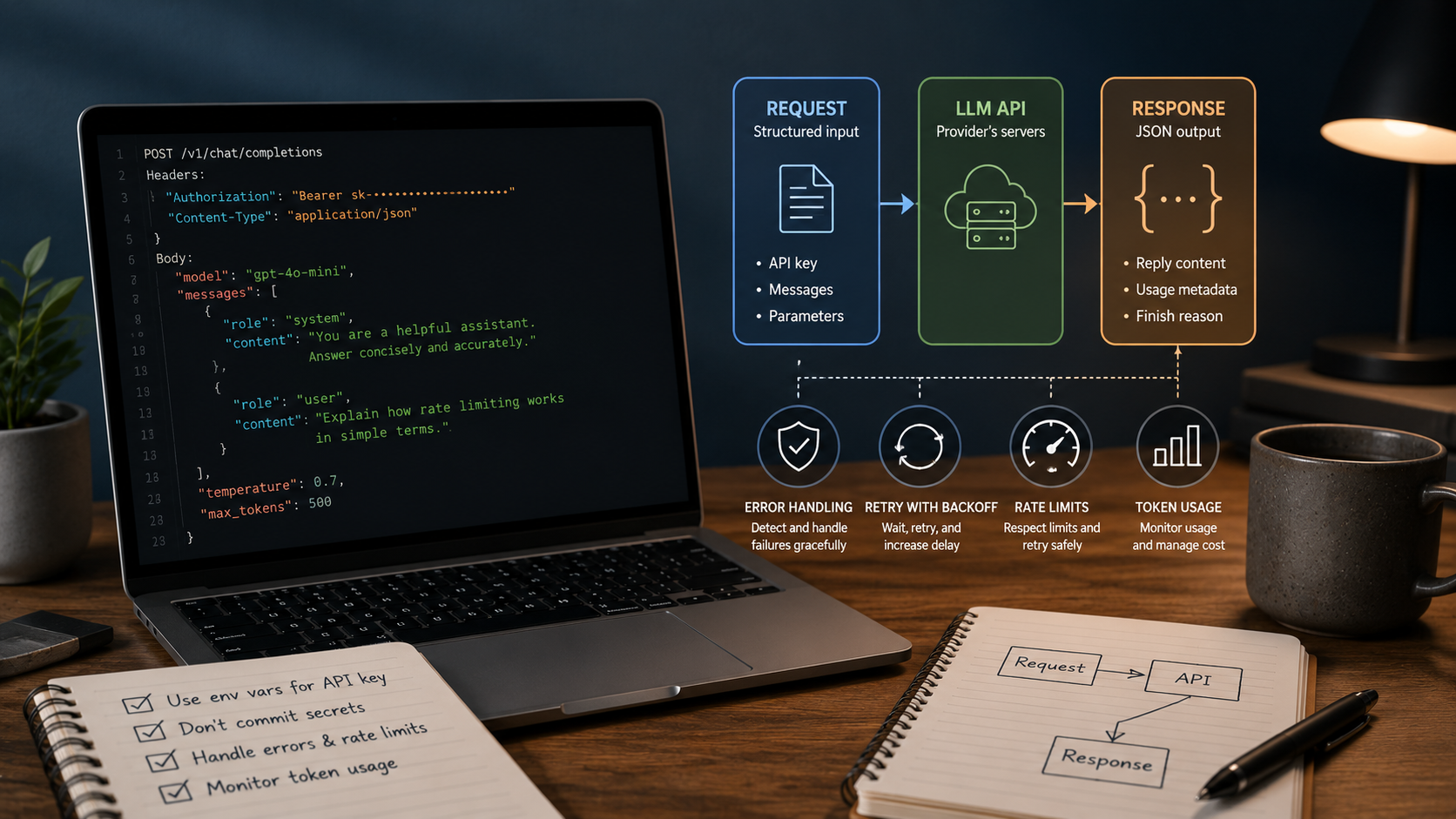
Key Takeaways
- Strip away the provider branding and every LLM API call follows the same skeleton: an API key, a structured request body, a JSON reply you have to parse yourself.
- The "system" message sets the ground rules for the whole conversation; "user" messages are individual turns - conflating the two trips up a lot of newcomers.
- Wire up error handling and rate-limit logic before you need it. Retrofitting it after something breaks in production is the harder, more painful way to learn the lesson.
About this app
That first LLM API call looks more intimidating from the outside than it actually is - once you see the request and response for what they are, the rest falls into place. Details shift between providers, but the core pattern stays put, and it's worth learning once properly rather than relearning it every time you switch vendors, whether you're prototyping on a laptop or wiring up a production backend.
Getting the authentication piece right
Authentication comes down to an API key, and every provider needs one. Load it from an environment variable, keep it out of source code entirely, and never let it end up committed to a public repo - it's the most common security slip newcomers make, and also the simplest one to sidestep from day one.
- Environment variables: name it something like OPENAI_API_KEY or ANTHROPIC_API_KEY, load it at runtime, and don't hardcode it as a literal string anywhere.
- Keep your secrets file out of git: if a .env file holds your keys locally, make sure it's in .gitignore before you ever run your first commit.
- Different keys for different environments: local dev, staging, and production should each get their own key, so a leaked dev credential can't touch production.
- When in doubt, rotate: any exposure - a brief one, even inside a private repo - is reason enough to revoke the key and issue a fresh one instead of gambling that nobody saw it.
What a request actually looks like
Chat-style APIs generally want a request body built around a list of messages, and each message carries a role. Knowing what each role is for separates an API call that happens to work from one you actually understand well enough to debug.
- system: the standing instructions behind the whole conversation - tone, role, constraints, whatever should stay true across every single turn.
- user: the specific question or instruction for this turn - what you want the model to do right now.
- assistant: the model's earlier replies, carried forward so it has context in a multi-turn exchange - leave this out and the model forgets what it just said.
A frequent early mistake is cramming standing instructions into the user message on every single call instead of setting them once, at the system level. It technically works, but it's wasteful - you're paying to resend the same instructions repeatedly - and it's also less consistent, because the model ends up reconstructing its role from a jumbled message rather than following one clean instruction set.
Making sense of the response
What comes back is structured JSON: the model's reply, plus metadata like token usage and a "finish reason" that tells you whether generation completed normally or got cut off mid-answer, usually from hitting a length cap. You have to pull the actual reply text out of that structure - don't assume the raw response is plain text ready to use. Most parsing bugs beginners hit come from skipping that step and printing the entire JSON blob instead of reaching into the field that holds the reply.
Walking through a first call
- 1. Get a key: sign up with a provider and pull an API key from their dashboard.
- 2. Store it properly: an environment variable, never a literal string sitting in your code.
- 3. Grab the SDK, or skip it: most providers ship an official client library, though raw HTTP works fine too if you want to see the request shape with nothing in between.
- 4. Assemble the message list: a system message for behavior, then one user message carrying your test question.
- 5. Fire the request and look at the raw output first: print the whole JSON response before you write a single line of parsing logic.
- 6. Pull out the reply text: extract the actual message content from that response structure.
- 7. Glance at the token counts: the usage metadata tells you what that single call actually cost.
Error handling and rate limits belong in version one
Don't leave error and rate-limit handling for later - build it into your first working version. A basic retry-with-backoff approach (pause, retry, lengthen the pause if it keeps failing) handles most transient hiccups without needing anything elaborate. And a rate-limit response isn't a sign something's broken - it's an expected, routine signal that you're calling faster than your current tier permits.
Look at token usage early too, since it's what most providers bill against and the count comes right back in the response metadata. Knowing what a typical request costs before you scale is a lot more comfortable than discovering it from a bill that doesn't match what you expected.
Mistakes worth avoiding from the start
| Mistake | Why it causes problems |
|---|---|
| Hardcoding the API key in source | It lands in version control and gets exposed the second the repo is shared or turned public |
| Calling the API straight from frontend code | Anyone inspecting the site's network requests can lift the key |
| Leaving out the system message | You end up repeating inconsistent instructions inside every user message |
| No retry logic | One transient failure or rate limit takes down the whole request instead of recovering gracefully |
| Not watching token usage | Costs creep up unnoticed until a bill shows up that doesn't line up with expectations |
Worth being upfront about: the exact endpoint URLs, parameter names, and available models vary between providers and shift as APIs get updated. Treat everything here as the underlying pattern to look for in any provider's documentation, and check that documentation directly before shipping anything to production.
Frequently Asked Questions
Do I need to be on a paid plan just to start experimenting?
Most providers give new accounts a free tier or a small starting credit, which is plenty for getting your bearings. Check the specific provider's current offer, since these terms shift over time.
Is it okay to call the API directly from my frontend code?
Better not to - route it through a backend server instead. An API key sitting in frontend code is visible to anyone who checks your site's network requests.