
Where AI Customer Support Actually Works, and Where It Still Needs a Person
A solid chunk of support tickets genuinely get resolved well by AI on its own. Here's a grounded look at where that automation holds up, and exactly which situations still call for a human.
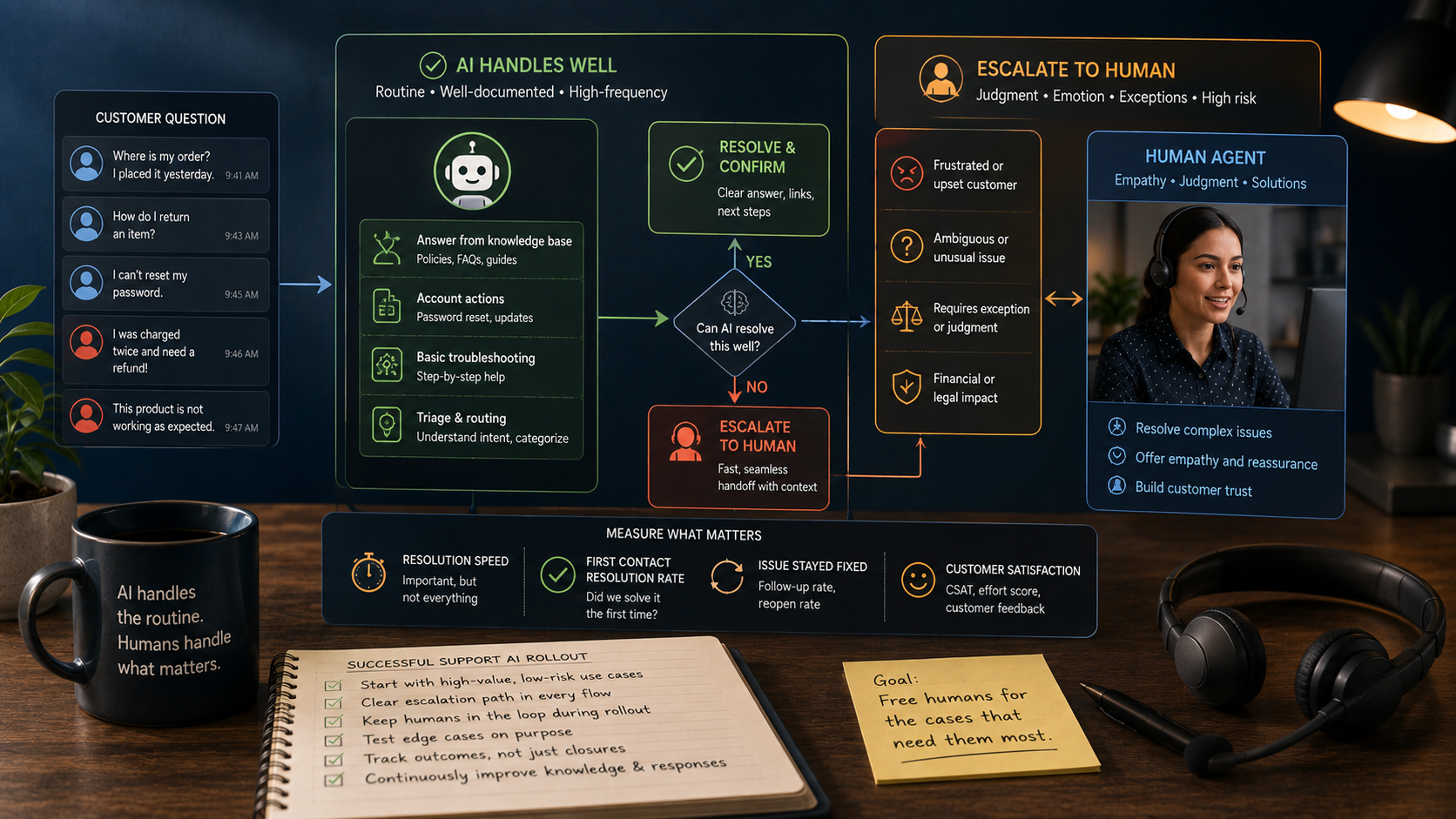
Key Takeaways
- AI support handles the routine, well-documented, high-volume questions reliably - it's precisely the messier cases that need a human's judgment most.
- An upset customer is reason enough to route to a person, no matter how trivial the actual question turns out to be.
- The support-AI rollouts that work best have a fast, obvious escalation path - the point is freeing up humans for the cases that need them, not writing them out of the picture.
About this app
AI customer support has come a long way from the days of the chatbot that couldn't answer a single real question. Point it at the right kind of question and it resolves things fast, accurately, without drama. The catch is that "right kind of question" is carrying a lot of weight in that sentence - figuring out exactly where that line sits matters a lot more than which vendor or model you end up choosing.
The territory where AI support genuinely delivers
The cases where it shines all share the same shape: they come up often, there's little room for interpretation, and the answer already lives somewhere in company documentation. Where's my order, what's your return policy, how does this feature work, when does shipping arrive - these all have one fixed correct answer that doesn't shift depending on someone's mood, tone, or the specifics of their day.
- Common, well-documented questions: order status, return policy, how a feature works - anything with a stable answer already written down somewhere.
- Simple account actions: password resets, basic troubleshooting, updating account details - anything with a clear, repeatable procedure behind it.
- Triage and routing: correctly reading what a customer actually needs and pointing them to the right place, even if the AI itself can't fix the issue.
- Gathering info upfront: pulling order numbers, error messages, and account details before a human agent even has to ask.
None of that requires the AI to read a customer's emotional state or exercise real judgment. It just requires matching a question to an existing answer, quickly and correctly - which happens to be exactly what these systems are good at.
The territory that still needs a person
A human is still the right call for anything emotionally charged - an upset customer generally needs a person handling the conversation for it to end well, regardless of how simple the underlying question is. The issue itself might take thirty seconds to fix, but the interaction around it isn't trivial, and treating it purely as a lookup problem tends to make people angrier, not calmer.
- Emotionally charged interactions: anger, frustration, or distress change what counts as 'resolved' - the customer needs to feel heard, not just processed through a script.
- Ambiguous or unusual requests: anything that doesn't cleanly map to a documented pattern is a bad fit for a system built to match patterns.
- Exceptions and judgment calls: cases that fall outside a written rule and require weighing context the rule never anticipated.
- Anything with financial or legal weight: refunds past a certain threshold, disputes, contract terms - situations where a mistake costs more than automation's speed is worth.
- Multi-issue tickets: one ticket that's actually three tangled problems, which AI tools tend to handle one at a time at best, or not at all.
A quick way to sort any given ticket
Most support teams don't need an elaborate decision tree - a short mental checklist, applied the same way every time, handles most of the work of deciding whether a ticket goes to AI or to a person.
- Step 1 - Read the tone: is the customer neutral, or already worked up? Frustration sends it straight to a human.
- Step 2 - Look for a documented answer: does it live in a knowledge base or policy doc, unaffected by context? If so, AI can likely take it.
- Step 3 - Weigh the stakes: would getting it wrong cost real money, create legal exposure, or damage the relationship? High stakes means a human.
- Step 4 - Check how unusual it is: does it match a known pattern, or is this genuinely a one-off? Genuine one-offs need judgment, not a lookup.
- Step 5 - Build in an exit: if it's not resolved within a couple of exchanges, hand it off automatically instead of looping the customer.
| Situation | Best handled by |
|---|---|
| Order status, shipping updates | AI |
| Return or refund policy question | AI |
| Password reset, basic account fix | AI |
| Frustrated or upset customer | Human |
| Unusual request with no clear pattern | Human |
| High-value refund or dispute | Human |
| Routing a complex issue to the right team | AI, then human |
What separates the rollouts that work from the ones that don't
Companies actually getting value from support AI aren't the ones trying to automate everything end to end - they're the ones who built a fast, obvious, low-friction way for a case to reach a person the second it steps outside what the AI handles well. A customer trapped in an automated loop with no way out is worse than never having deployed AI support in the first place. It doesn't just leave the issue unresolved - it actively burns the relationship while doing it.
That escalation path deserves real design attention, not an afterthought. It should take one step to reach, not be buried three menus deep, and it should fire automatically on clear signals - repeated frustration, a direct request for a human, or the AI simply stalling after a couple of exchanges. Teams that treat escalation as a footnote tend to end up building the exact dead-end loops that torch customer trust fastest.
Tracking the metric that actually matters
How fast a ticket closes is easy to measure and easy to over-optimize, but it's not the full picture. A ticket that closes quickly without actually fixing anything is worse than one that takes longer but genuinely solves the problem - the fast one just shifts the frustration to a second contact instead of getting rid of it. What matters is whether the issue actually stayed fixed, not how quickly it got marked closed.
- Resolution durability: did the same customer come back with the same issue a few days later?
- Escalation friction: how many steps does an upset customer have to go through to reach a human?
- Handoff quality: does the human agent inherit full context, or does the customer have to repeat the whole story?
- Post-resolution sentiment: not just whether the ticket got closed, but how the customer actually felt about the exchange.
None of this is a case against using AI for support - the well-documented, high-volume cases really are handled faster and better by automation. It's a case for being honest about exactly where that stops being true, and for building the handoff so that crossing the line doesn't cost the customer anything.
Frequently Asked Questions
Do customers generally go along with AI-handled support?
That depends heavily on how well it actually resolves things and how easily they can reach a human when they need one - a fast, correct AI answer is usually well received, while a frustrating dead-end loop isn't, regardless of anyone's general opinion of AI.
What's the biggest risk of leaning on AI too heavily for support?
Customers with genuinely hard or emotional problems getting stuck with no quick route to a human - that does more damage to the relationship than the original issue ever would have, and it's the single most common complaint about poorly built support AI.