
What Really Happens to the Stuff You Type Into an AI Chatbot
Drop something sensitive into an AI chat window and it doesn't just vanish after you get your answer. Here's where that text actually ends up - storage, model training, and the questions worth asking about any tool you use regularly.
Key Takeaways
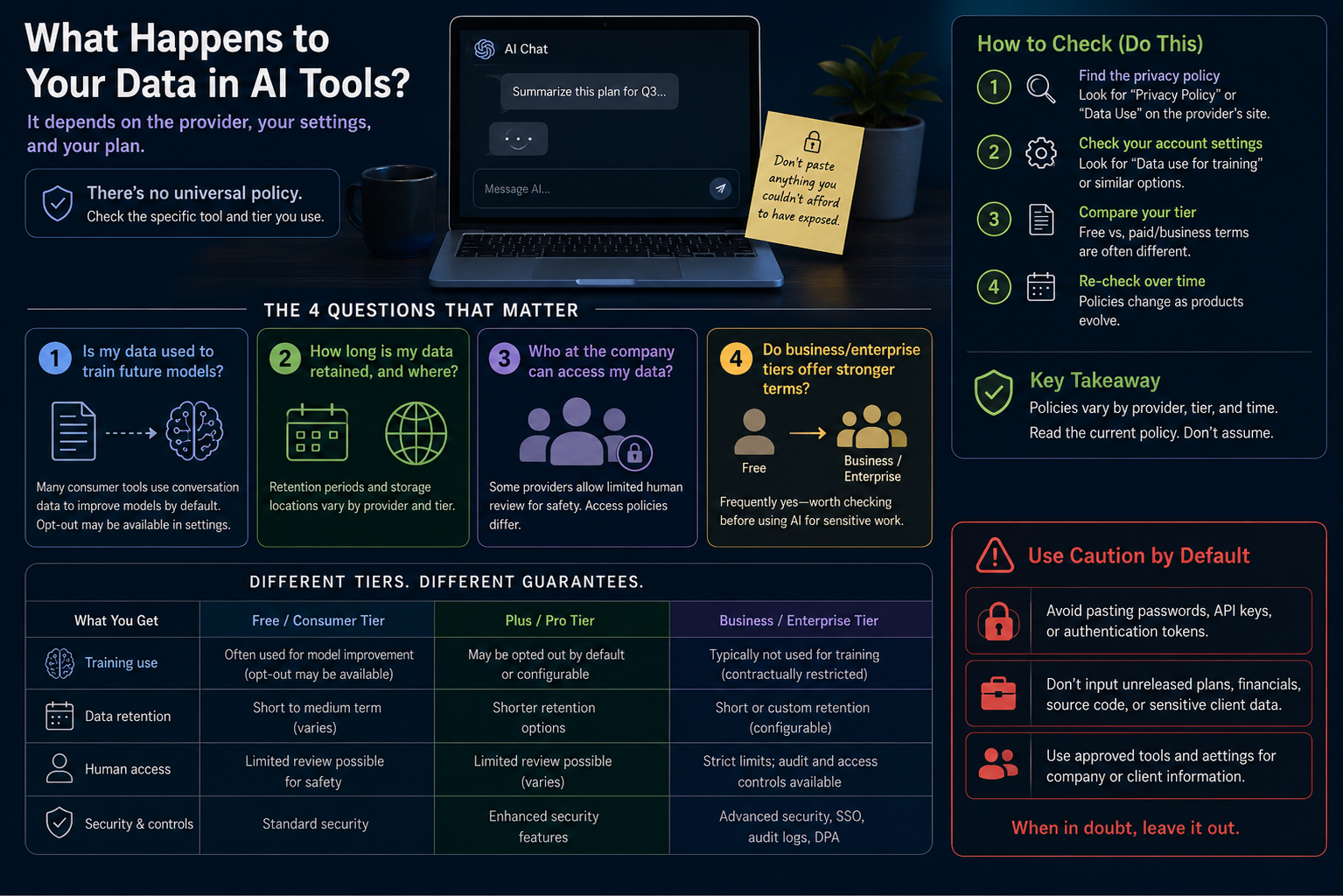
- There's no single answer for what happens to your input - it comes down to which provider you're using and how your account is configured.
- A lot of consumer-facing tools feed your conversations into future model training unless you actively turn that off - assuming otherwise is a mistake, go check the setting yourself.
- Business and enterprise plans tend to come with sturdier data-handling promises than the free consumer version of the same tool - worth confirming if you handle anything sensitive.
About this app
Before you drop a client's name, an unreleased product detail, or anything personal into an AI chat window, it's worth actually knowing what becomes of it afterward - not just trusting a vague, positive impression of the company that built the tool.
What actually happens after you hit send
Hit send and your message usually moves through several separate stages, not just one: it gets processed so the model can answer you, it might get logged for abuse and safety monitoring, it could sit on a server for a while, and - as a completely separate matter - it may or may not later feed into training or fine-tuning a future model. Each stage lives under its own policy, and providers mix and match them differently. One tool might swear off training on your data yet still hold your chat logs for months; another might delete conversations quickly while still folding aggregated input into model improvement in the meantime. Read any privacy policy with those four questions separated out - processing, logging, retention, training - and it gets a lot easier to tell what's actually promised from what's merely implied.
Four questions worth asking about any tool you use
- Does your input train future models: on plenty of consumer-tier tools, yes, by default - and the opt-out is often tucked away in account or privacy settings rather than shown to you when you sign up.
- How long does the provider keep your data, and where: retention periods differ a lot between providers and between tiers of the same product, and some companies store data in different regions depending on your account type.
- Who's actually able to see your conversations: several providers keep a limited human-review pathway for safety and abuse detection, and how tightly that access is scoped and logged varies by policy.
- Do the paid or business tiers get different terms: often, yes - enterprise and business agreements commonly include no-training guarantees or shorter retention windows the free tier simply doesn't offer.
There's no single industry norm sitting underneath any of this. Every provider sets its own policy, that policy often differs between the free and paid version of the exact same product, and it shifts as the product itself evolves. Lumping every "AI tool" into one category with one privacy answer is the actual mistake here - the honest answer is always closer to "depends on this specific tool and tier, so go read its current policy."
Free tools versus paid business and enterprise plans
This is usually where the meaningful privacy differences actually sit - between a free consumer account and a paid business or enterprise one. A free tier is often subsidized, at least partly, by feeding conversation data back into product improvement, which is a fair enough trade for a tool that costs nothing but is still worth knowing about. Paying for a consumer subscription sometimes changes that picture, and business or enterprise plans - built for organizations dealing with client records, internal documents, or regulated information - much more often carry contractual data-handling commitments that a personal account just doesn't get. Anyone using AI tools around other people's information should treat checking for those stronger terms as a first step, not an afterthought.
| Account type | Training use by default | Retention window | What to verify |
|---|---|---|---|
| Free consumer tier | Usually on | Set by the provider, sometimes for months | Whether a training opt-out setting exists |
| Paid consumer tier | Depends on the provider | Sometimes shorter or user-adjustable | Whether paying actually changes the policy |
| Business / team tier | Usually off | Often configurable by an admin | The terms of the data processing agreement |
| Enterprise tier | Generally off | Usually spelled out contractually | The formal data-handling contract itself |
A five-minute check for any tool you already rely on
- Dig into account or settings: look for anything labeled data controls, privacy, or model training.
- Find the training switch: if it exists, check whether it defaults to on or off, and flip it if that default doesn't match how you feel about it.
- Read the retention line: note how long conversations stick around and whether you can manually delete them.
- Compare the tiers: if there's a paid or business version, confirm its privacy terms are explicitly stated as different - don't just assume they are.
- Come back to it later: policies change as products evolve, so a setting you checked a year ago might not reflect today's default anymore.
Whatever a given tool's policy actually says, default to keeping anything you truly can't afford exposed - passwords, unannounced plans, sensitive client details - out of any AI chat window, the same way you'd guard it around any other third-party service. The real answers sit in a tool's privacy policy and account settings, usually somewhere near "data use for training," and reading that directly takes maybe ten minutes for a tool you use often - a lot more reliable than going off what a friend told you about a completely different product.
A quick gut-check for what not to paste
When you're not sure whether something's safe to type into an AI tool, try this: would you be fine with that same text sitting in a work email that a few unnamed people at the company might read later for quality review? That mental test covers the real risk reasonably well for most consumer tools, and it doesn't require reading a full legal policy every single time. If the honest answer is no, strip out names, account numbers, or other identifying details before you paste - or just skip the AI tool for that particular piece of content.
Frequently Asked Questions
Is typing sensitive information into an AI tool ever completely risk-free?
Certain tools and tiers back up strong claims - no training use, limited retention, encryption - that genuinely cut the risk down, but "completely safe" is a big promise to take at face value. Check the actual current policy rather than leaning on marketing copy.
Does paying for a subscription automatically mean better privacy than the free tier?
Often, though not always - plenty of providers do offer stronger terms on paid or business plans, but it isn't a guarantee across every product out there. Look at the specific terms attached to your tier instead of assuming payment alone fixes it.