
Skip the Broker: House Hunting Straight From Owner to Buyer
A hands-on look at Find My Property, a real estate app that connects buyers, sellers, and renters directly, with a field area measure and loan EMI calculator thrown in.
Get this app
About this app
Anyone who's tried to buy, sell, or rent a place knows the drill - scroll through five listing sites, call an agent who swears they'll call you back, then wait. And keep waiting. Find My Property strips a few of those steps out by putting buyers, sellers, and owners in the same app so they can talk to each other directly, with no broker sitting in the middle of the conversation.
A property app built for going direct
The pitch is simple: browse homes and commercial spaces for sale or rent, and when one catches your eye, reach the owner directly by phone or email instead of routing everything through a listing agent. If you're the one selling or renting out a place, putting it up takes minutes - a few photos, a description, a price, and it's live. There's no forced sign-up funnel pushing every lead through a commission structure, and that's really the main thing separating it from the bigger listing portals.
The flip side is that cutting out the middleman shifts the vetting work onto you. With no agent screening calls or coordinating viewings, buyers and renters have to handle a bit more of their own due diligence before showing up at a property or sending anyone money.
Building a search that actually gets you somewhere
Getting going means picking a lane - buy, rent, or sell - then filtering by location, property type, budget, and size. That filtering matters more than you'd expect, since a property app with a thinner listing base can look empty if your search is too narrow. A few habits help:
- Start wide, then tighten up – check a broader radius first to see how many active listings actually exist nearby before narrowing filters down to nothing.
- Check when the listing went up – a property that's sat untouched for months is worth a cautious message before you get too attached to it.
- Save the search itself, not just properties – returning to the same filter setup beats rebuilding a shortlist one listing at a time.
- Send a message before you call – a quick email tells you how responsive an owner actually is before you commit to a phone call or a drive across town.
What sets it apart from a basic listings feed
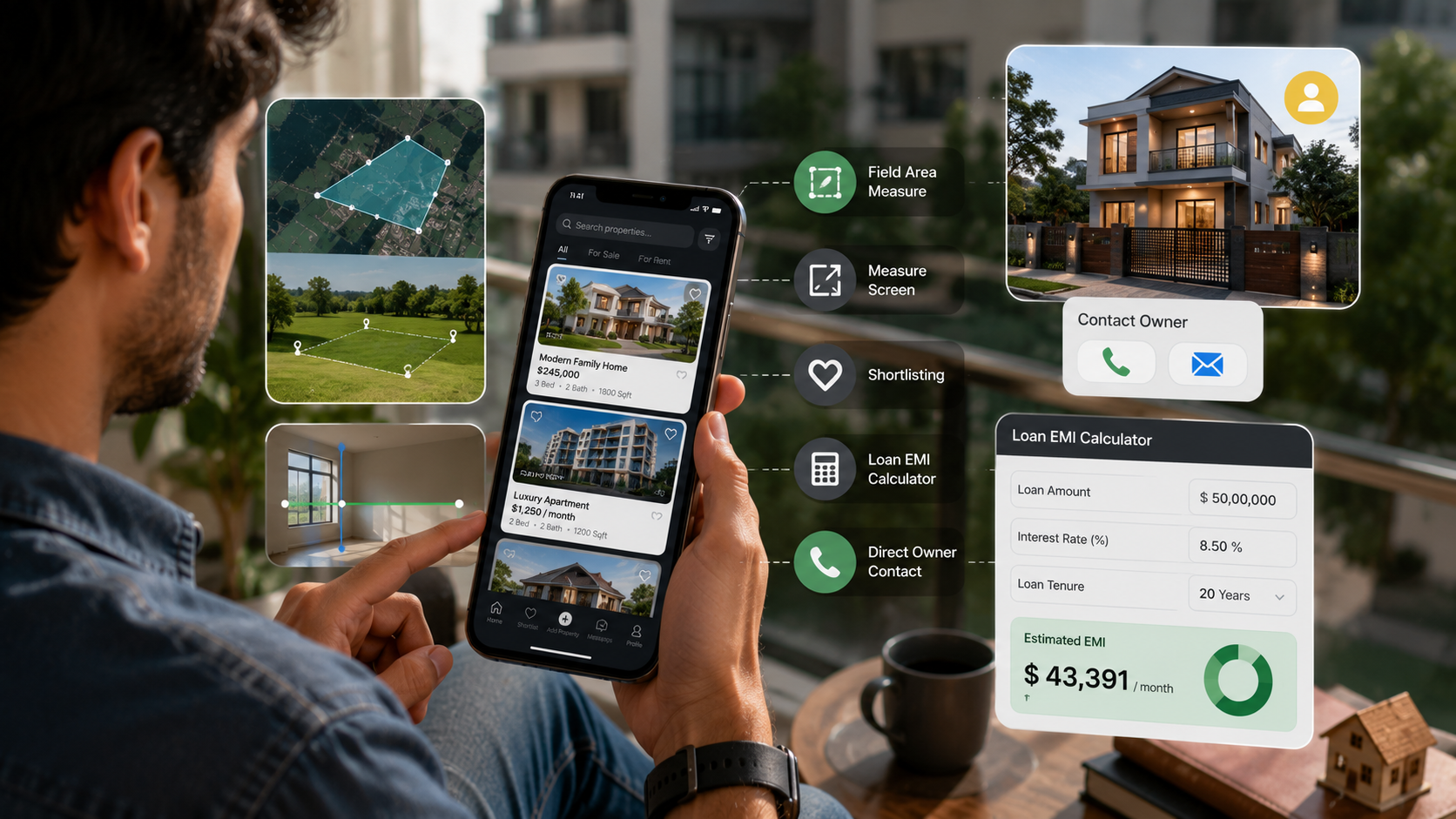
- Field area measure – a GPS tool that works out the size of a plot, farm, lawn, or garden right on the spot, handy when you're eyeing land and the listed square footage seems off.
- Measure Screen – point your phone at a room and get a rough read on its dimensions before you've even booked a walkthrough.
- Shortlisting – save the properties you're actually serious about so you're not rebuilding the same filters every time you open the app.
- A loan EMI calculator – enter the loan amount, interest rate, and tenure to see your estimated monthly payment before you fall for a place you can't really afford.
- Direct owner contact – phone or email whoever listed the property, no third party relaying messages back and forth.
The field area measure and Measure Screen tools are what really separate this from a plain listings app. Most property apps stop at photos and a floor plan; here you can stand on a plot and get a rough size reading without ever pulling out a measuring tape, which is genuinely handy for land and farm listings where the advertised area and the real one don't always line up.
Direct contact versus going through an agent
| Find My Property (direct) | Traditional agent | |
|---|---|---|
| Speed to first contact | Immediate - call or email the owner | Depends on agent availability and callback |
| Cost | Free to browse and list | Commission on sale or rental, typically |
| Vetting of the other party | On you | Partially handled by the agent |
| Built-in tools | Field measure, EMI calculator, shortlisting | Varies by agent or brokerage |
| Listing density | Depends on local user base | Usually broader, especially in cities |
A few things worth knowing before you install
It's free with ads and in-app purchases, carries an all-ages rating, and holds a solid 4-star average across nearly 600 reviews - respectable for a real estate app in a crowded space. At 10K+ downloads it isn't the biggest name in property apps, so listing density will vary by location; expect it to feel more useful in areas where the developer already has an active base of people posting listings.
- Ads and in-app purchases – free to use, but expect the occasional ad break and optional paid upgrades.
- A smaller user base than the big portals – worth checking how many listings actually exist in your city or neighborhood before you rely on it as your only source.
- No agent acting as a safety net – verify ownership documents yourself and meet in safe, public places for first viewings, the same precautions you'd take on any classifieds-style platform.
- Better as a supplement than a sole source – cross-check a property's asking price against nearby listings elsewhere before making an offer.
Where this fits into a bigger house hunt
If you're still at the browsing stage and tired of handing your number to yet another agent, this app is worth a look before you commit to anything bigger - and the built-in EMI calculator alone might save you from a few overly optimistic showings. Treat it as one channel among several rather than your only stop: pair it with a bigger listings portal for volume, and lean on Find My Property for direct owner contact and the on-the-spot measuring tools most competitors skip.