
Tired of a Blank Grey Screen When Your Phone Rings? Try a Photo Caller ID App
A caller ID and dialer app that swaps your phone's bland stock call screen for full-screen photos of whoever is calling, plus custom ringtones and flash alerts, made for anyone sick of squinting at a bare number.
Get this app
About this app
There was a stretch, somewhere around 2015, when phones just stopped bothering to show a photo the instant someone called, and everyone quietly accepted a plain grey screen with a number as the norm. It doesn't have to stay that way. If you've ever wondered how a friend gets a full photo to fill their whole screen the moment they call you, this is usually the reason.
A Dialer That Also Designs Your Caller ID Screen
Photo Caller Screen Dialer asks you to make it your default phone dialer, and that's not an arbitrary permission grab - it's the only route available. Android simply won't let a regular app redesign the incoming call screen unless that app is the one actually handling the call, so any tool promising a custom caller ID has to request this role up front. Once you grant it, the app takes over dialing, call logs, blocking, and the full visual layer of every incoming call, replacing the stock experience completely rather than layering something on top of it.
Getting It Running
Going from install to an actual photo popping up on your screen doesn't take long, but skip one step along the way and you're the one left wondering why nothing changed.
- 1. Download it, open it, and follow the prompt that asks you to set it as your default phone app.
- 2. Approve the permissions it requests - phone, contacts, and call log access - since without them it has no way of knowing who is calling.
- 3. Choose a contact and attach a photo, or skip that step and let it pull one automatically if the contact already has an image saved.
- 4. Pick a layout - square, circle, or a widescreen crop - and preview it before it actually goes live.
- 5. Assign a ringtone or flash alert to the handful of people worth recognizing by sound or light alone.
What Actually Makes This Worth Installing
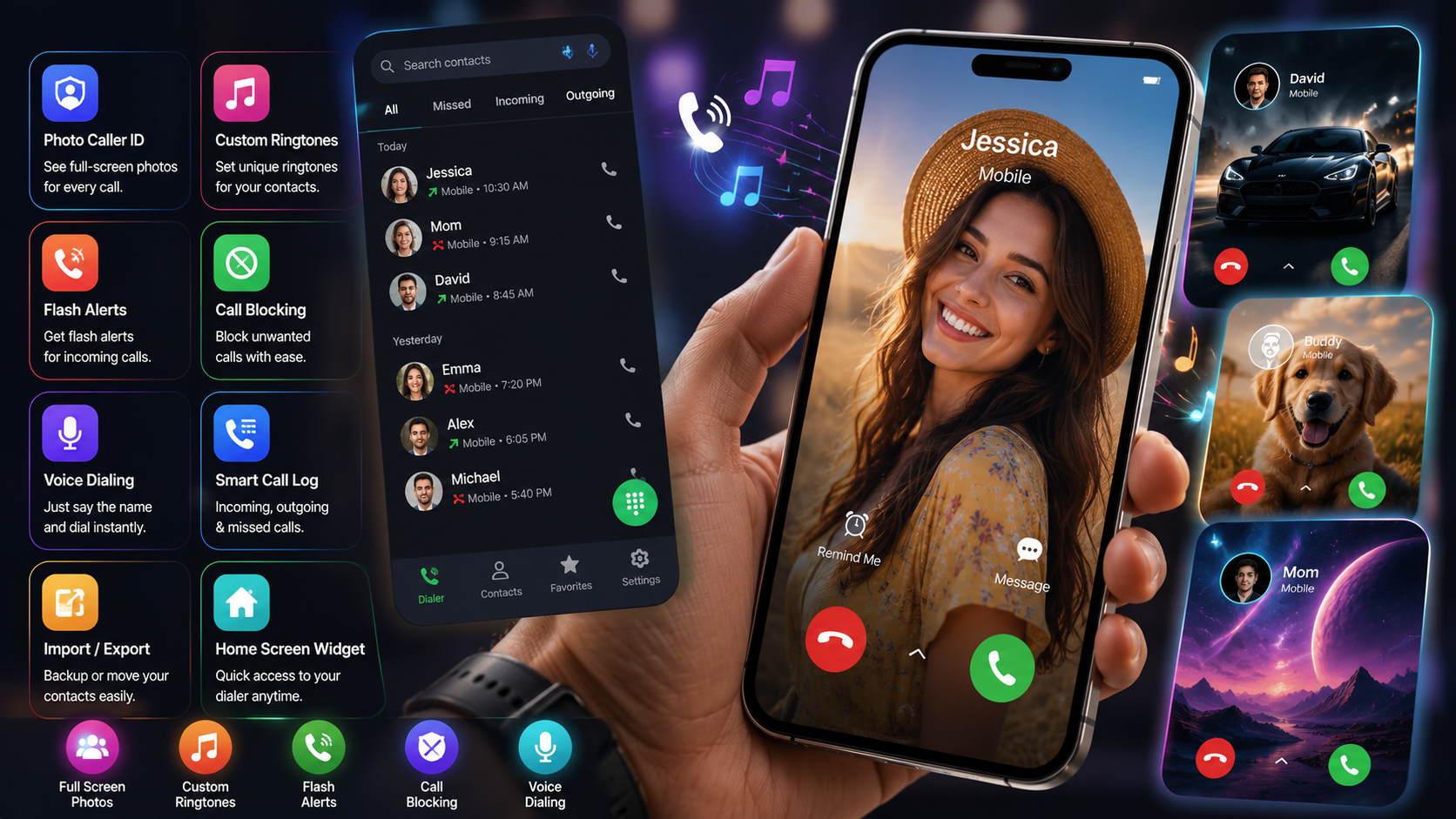
- Full-screen photo caller ID: attach a photo to a contact and it takes over the entire screen the moment they call, with layout choices from square to circle to a genuine widescreen crop.
- Voice dialing: say a name or number out loud instead of typing it, useful the second your hands are full.
- Per-contact ringtones and flash alerts: recognize a caller purely by the sound playing, or by a flashing light when the phone is silenced.
- Built-in blocking: block a number or contact right from the dialer, no detour through a buried settings menu required.
- Import, export, and a home screen widget: shuffle contacts in and out easily, and dial straight from the home screen without opening the app first.
- A call log that actually separates things: incoming, outgoing, and missed calls each get their own view instead of one jumbled feed.
Stock Dialer vs. This One, Side by Side
| Feature | Stock Dialer | Photo Caller Screen Dialer |
|---|---|---|
| Incoming call screen | Just a name and number on a bare background | A full-screen contact photo with multiple layout choices |
| Ringtone control | Usually one ringtone, per-contact only on select skins | Per-contact ringtones and flash alerts included |
| Call log | Everything lumped into one feed | Split cleanly into incoming, outgoing, and missed |
| Blocking | Tucked away in settings on most phones | Right there in the dialer itself |
| Quick access | Just the standard app icon | A home screen widget for one-tap dialing |
| Permissions required | Nothing beyond default OS access | Default dialer status plus contacts and call log access |
A Couple of Things Worth Weighing First
Making any app your default dialer isn't a small ask - by design, it can see your call log and your contacts - so this trade only makes sense if the photo caller ID feature genuinely matters to you. It's ad-supported, sells in-app purchases, carries a 3+ rating, and has been downloaded more than 10 million times. That 3.3-star average sits lower than the download count might suggest, which usually points to a core feature that works fine while a noticeable slice of users run into friction around permissions or ad frequency.
It's also worth test-driving on your specific phone before trusting it as your everyday dialer. Certain manufacturer skins are pickier about letting any app fully take over the default dialer role, and aggressive battery optimization can quietly block the call screen pop-up if the app isn't whitelisted. The fastest way to catch problems is a test call from a second phone right after setup - that confirms immediately whether everything's actually wired up.
Who This Is Actually For
This isn't trying to be everyone's app, and it shouldn't be. If you spend real time on the phone with a tight circle of people, or you just miss seeing a full photo fill the screen, you'll get the most out of it. If you rarely pick up calls at all, or you're not comfortable handing default dialer access to a third-party app, the stock screen is probably the safer choice.
If a plain caller ID screen has never once bothered you, skip this without a second thought. But if you still miss the days when your best friend's face filled the whole screen the second they called, that's essentially the entire reason this app exists.