
Three TVs, Three Brands, One Missing Remote - Here's the One-App Fix
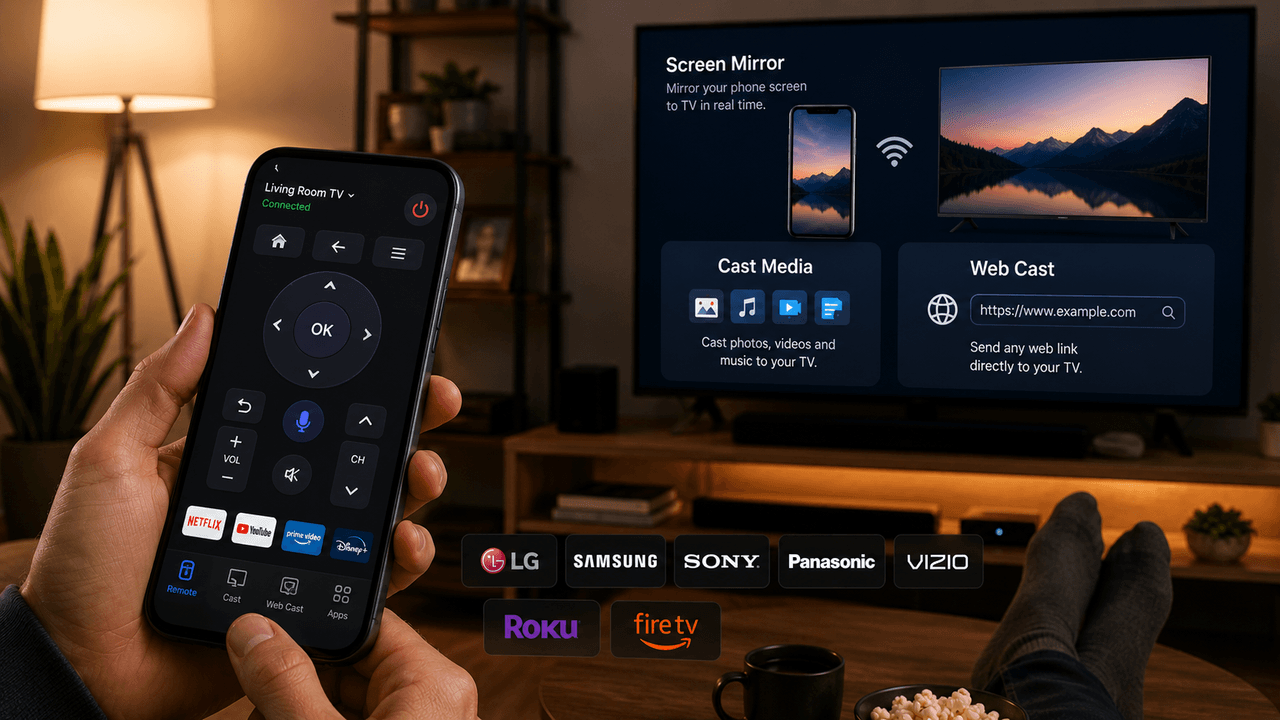
Smart TV Cast - Remote Control handles LG, Samsung, Sony, Panasonic, Vizio, Roku, and Fire TV from one app - including a web-cast feature most phone-as-remote apps skip entirely.
Key Takeaways
- One app works as a Wi-Fi remote across LG, Samsung, Sony, Panasonic, and Vizio TVs, plus Roku and Fire TV devices - built for a household with mismatched TV brands.
- Beyond remote control, it mirrors a phone screen to the TV and can cast media files or a live device screen without a physical dongle.
- The Web Cast feature sends a specific web link straight to the TV over local Wi-Fi, a feature many phone-as-remote apps skip.
- Both devices need to be on the same Wi-Fi network, and feature availability varies by TV brand, model, and firmware.
- It's not affiliated with or endorsed by any of the TV brands it supports - it's an independent remote-control tool.
Get this app
About this app
Anyone who's lived in a shared household - roommates, a multi-generational home, a rental furnished by three different landlords over the years - knows this exact annoyance: the living room TV is one brand, the bedroom TV is another, and somewhere a third remote has gone permanently missing under a couch cushion. Universal remotes exist, but they're one more physical object to misplace, and they don't do anything for a TV in another room.
Smart TV Cast - Remote Control is built around solving that specific, unglamorous problem: one app, controlling whichever TV is actually in front of you, regardless of brand.
Cross-brand control, not just one ecosystem
The app connects over Wi-Fi and works as a remote for LG, Samsung, Sony, Panasonic, and Vizio TVs, along with Roku and Fire TV devices - which covers most of what actually shows up across a typical household with TVs bought at different times from different stores. That's the meaningful difference from a remote app tied to a single brand's ecosystem: it's built for the reality of a mismatched household, not an idealized one where every screen matches.
Why 'one remote per brand' became normal in the first place
This mismatch didn't happen by design - it's just what accumulates naturally. A TV bought during a moving-in rush, a hand-me-down from a relative, a landlord-supplied set already mounted when a lease started: none of those purchases get made with brand consistency in mind, and each one typically arrives with its own proprietary remote. A few years into living somewhere, it's entirely normal to end up with a stack of TVs that have nothing in common except a power button.
That's really the gap a cross-brand app like this is filling - not replacing a brand's official remote app, which usually works fine for that one brand, but covering the household as a whole instead of one screen at a time. Whether that actually saves a trip back upstairs to find a specific remote depends on all the TVs in the house actually being covered, which is why the brand list matters as much as any individual feature.
Screen mirroring and media casting
Beyond acting as a remote, the app mirrors a phone's screen to the TV directly, and can cast media files or a live device screen without needing a physical dongle plugged in. For anyone who's ever wanted to show a group of people something on their phone without passing it around the room, this is the more comfortable version of that moment.
The feature worth calling out specifically: Web Cast
Less obvious, and genuinely useful, is the app's ability to cast a web link directly to the TV over local Wi-Fi - pushing a specific page or piece of web content to the big screen rather than just mirroring whatever's currently on the phone. It's a small feature, but it covers a real gap: plenty of phone-as-remote apps handle media files and screen mirroring but don't offer a clean way to send a specific web link straight to the television.
Setting expectations correctly
A few things are worth knowing before relying on this as a full remote replacement:
- Both the phone and the TV need to be on the same Wi-Fi network - this won't work across different networks or over mobile data
- Feature availability and reliability vary by TV brand, model, and firmware, so the experience on an older TV may be more limited than on a recent one
- Most TVs prompt for an on-screen permission the first time a new device connects - expect one extra step on first use, not a silent connection
- The app is explicit that it isn't affiliated with, authorized by, or sponsored by any of the TV brands or platforms it supports - it's an independent remote-control tool, not an official companion app
Worth knowing
It's a smaller listing so far (4.3 stars, 156 reviews) and includes ads and in-app purchases, typical for a free utility in this category.
It's worth setting up before it's actually needed, too, rather than mid-argument over the last remote in the house. A quick one-time connection to each TV on the home network means the app is ready to go the next time a physical remote goes missing, instead of adding troubleshooting time to an already annoying moment. The same setup also means guests or family members visiting from another household - who are likely used to a completely different brand and remote layout - can control whichever TV they're in front of without needing a walkthrough first. That's a small but real convenience that a universal physical remote, ordered once and left in a drawer, doesn't really solve on its own.
The practical upside is straightforward: instead of tracking down whichever remote goes with whichever TV - or replacing a lost one - one app on a phone that's already in hand covers the room, regardless of which brand happens to be mounted on the wall.
Frequently Asked Questions
Does this work if my phone and TV are on different networks?
No - the app connects over Wi-Fi, so both the phone and the TV need to be on the same network. It won't work across different networks or over mobile data.
What is the Web Cast feature?
It lets you push a specific web link directly to the TV over local Wi-Fi, rather than just mirroring whatever's currently on your phone screen - a feature that plenty of phone-as-remote apps don't offer.