
Handing Your Phone to a Kid for Five Minutes Shouldn't Be a Gamble
AppLock: Hide Apps & Vault locks individual apps behind their own PIN and can disguise itself as a calculator - a look at how that two-layer trick actually stops someone poking around.
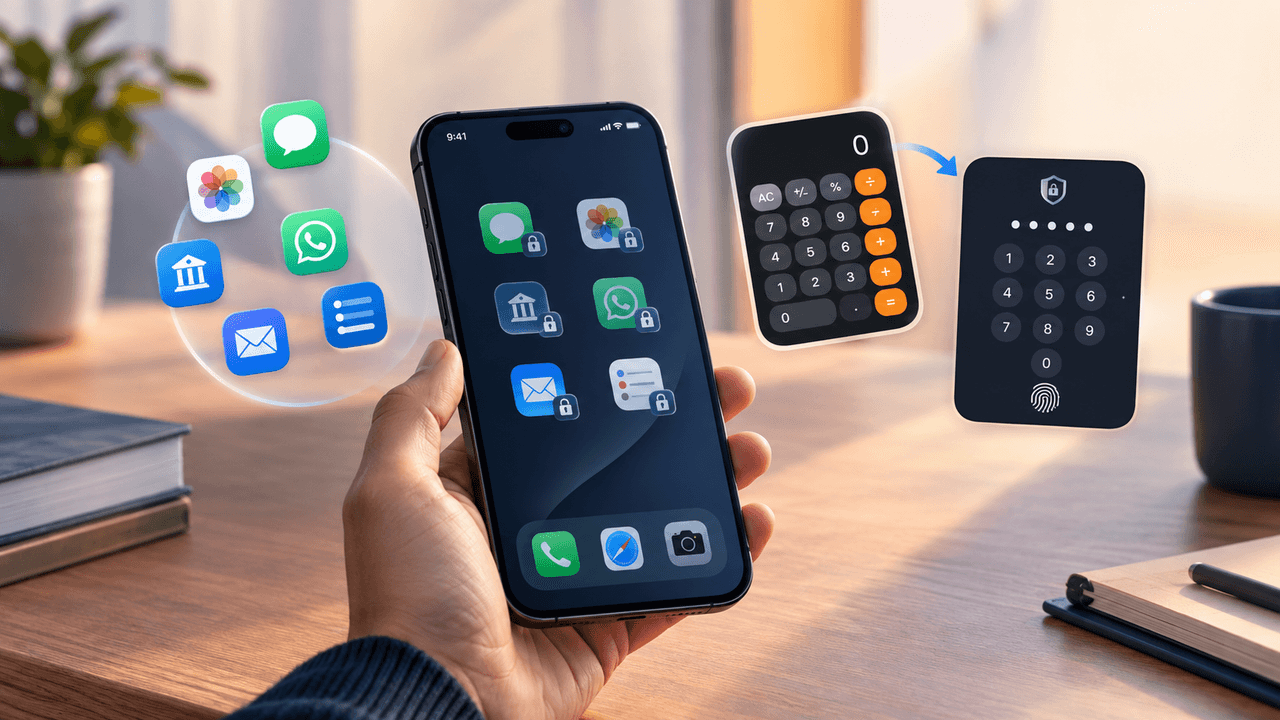
Key Takeaways
- Instead of locking your whole phone, it locks the individual apps you choose - so handing your phone to someone doesn't mean handing over everything on it.
- The calculator disguise matters more than it sounds like it should. A padlock icon tells someone exactly what you're hiding; a calculator tells them nothing at all.
- It's built to stop casual snooping, not a determined attacker who has your phone for hours - don't mistake it for full-device encryption or two-factor authentication.
- Notification previews are the gap almost everyone misses. A locked app can still flash a text on your lock screen unless you turn that off yourself, separately, in your phone's own settings.
- A few failed unlock attempts in a row quietly snaps a photo on the front camera, so a bad feeling about someone snooping turns into an actual timestamped picture.
About this app
Someone asks to borrow your phone to check a bus schedule or look at a photo, and for the ten seconds it's in their hands, every app on the home screen is fair game. Most people's instinct is to lock the whole phone with a stronger passcode, but that solves the wrong problem - a phone that's already unlocked and handed over doesn't care how strong the lock screen was. What actually needs protecting is what happens after the phone is already open.
AppLock: Hide Apps & Vault is built around that specific moment. Rather than locking the device, it locks individual apps - a banking app, messages, a gallery, a specific chat - behind their own PIN, pattern, or fingerprint check, so a phone that's unlocked and handed over still has closed doors inside it.
Per-app locking is a different model than most people expect
The default assumption most people carry is binary: a phone is either locked or it isn't. AppLock's actual model is closer to a house with a front door that's open but several interior rooms that each need their own key. Selecting which apps to protect takes a few taps in the app's dashboard - a checklist of installed apps, toggle the ones that matter - and each one then requires its own unlock the next time it's opened, independent of whatever state the phone itself is in.
This solves a specific, common scenario cleanly: handing a phone to a kid to watch a video, letting a friend take a photo, passing it to a coworker to look something up. The phone stays usable for whatever it was handed over for, while the apps that actually matter - banking, messaging, photos, whatever's been flagged - stay closed behind their own check.
A second mode locks specific content rather than a whole app: individual contacts, specific photo albums, or particular conversations inside apps that support it, rather than the entire app. That granularity matters for the realistic case where 95% of an app is fine for anyone to see and the concerning part is one folder or one thread.
The disguise feature is the part that actually changes the calculation
Locking an app stops casual snooping, but it also announces itself - a locked app icon with a little padlock badge tells anyone looking exactly which apps have something worth hiding, which somewhat defeats the point. AppLock's more interesting feature is letting the vault app itself wear a disguise: it can be set to appear on the home screen as an ordinary calculator icon, opening a fully functional calculator app to anyone who taps it, with the actual vault only reachable by entering a specific numeric sequence into that calculator interface.
This is a meaningfully different threat model than a padlock badge. A locked app icon invites a "what's behind this" question. A calculator icon invites no question at all, because there's nothing unusual to notice - it looks like every other calculator on the phone, works like one for basic arithmetic, and gives no visual indication that a hidden interface exists behind it. For anyone whose actual concern is a specific person - a curious kid, an ex with the old passcode, a roommate who borrows the phone - the difference between "locked and visible" and "invisible entirely" is the whole point.
What it protects against, and what it genuinely doesn't
It's worth naming the limits plainly here, because a false sense of security is worse than none at all. App-level locking protects against casual access - someone picking up an unlocked or briefly borrowed phone and poking through apps out of curiosity or opportunity. It does not protect against a determined, technically capable attacker with extended physical access to the device, and it is not a replacement for full-device encryption, a strong lock-screen passcode, or two-factor authentication on the accounts that actually matter.
It's also worth knowing that app-locking tools generally can't intercept notifications - a locked messaging app can still pop a preview of an incoming text on the lock screen unless notification previews are separately disabled in the phone's own settings. That's a phone-level setting, not something any app-lock tool can override, and it's the single most common gap people miss: locking the app while leaving notification previews on defeats a meaningful chunk of the point.
The break-in log is a quieter feature worth knowing about
A less flashy inclusion: several PIN or fingerprint failures in a row trigger a photo capture using the front camera, timestamped and stored in a log only visible from inside the unlocked vault. It won't identify a stranger, but for the realistic scenario - a specific person who keeps trying old passcodes - it turns "I have a bad feeling someone's been in my phone" into an actual photo and timestamp, which is a very different conversation to have than a vague suspicion.
What actually changes
The gap between "my phone is locked" and "my phone is actually private" is bigger than most people assume, because the lock screen only ever covers the moment before the phone is unlocked - it has nothing to say about what happens in the minutes after that, when the phone is open and in someone else's hands. Locking specific apps closes that gap directly, and disguising the lock itself closes the much smaller but real gap of a badge icon giving away exactly what's worth looking at. Between the two, what actually changes is simple: a phone can be handed over freely again, without a mental inventory of what's currently open on it.
Frequently Asked Questions
If I lock an app, does that stop its notifications too?
No, and this trips people up. Notification previews are controlled by your phone, not by the app-lock tool, so a locked messaging app can still show a text preview on your lock screen unless you disable previews yourself.
Is the disguised calculator still a working calculator?
Yes, completely - it adds and subtracts like any other calculator app would. The vault only shows up once you type a specific number sequence into it.