
Your Glove Box Is Full of Receipts You'll Never Look At Again
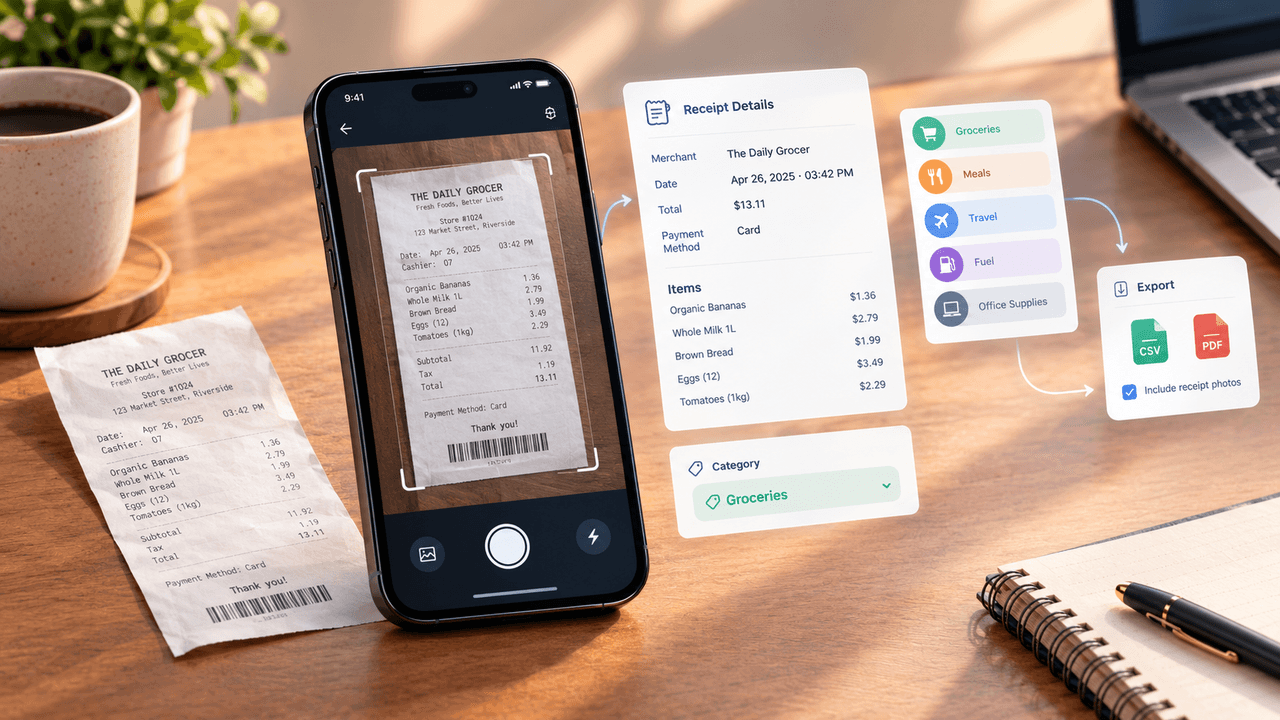
Receipt Scanner: Expense Tracker turns a five-second photo into a categorized, searchable expense record - a look at what that actually saves you at tax time versus a shoebox full of faded paper.
Key Takeaways
- A five-second photo gets you a searchable record - merchant, date, total, line items - instead of just another photo buried in your camera roll.
- The categorization is what actually keeps people using it. Sorting receipts by hand is the real reason most expense-tracking habits fizzle out after a few weeks.
- When it's time to file, you get a CSV or PDF, plus the option to bundle in the original receipt photos if your accountant or an audit needs the real document.
- Handwriting, faded thermal paper, and receipts in other languages still trip up the OCR sometimes, so it's worth a quick glance at the total before trusting it blindly.
- None of it matters if the receipt doesn't get scanned in the moment - tucking it away "to do later" is usually just a slower way back to the same pile.
About this app
Every glove box, junk drawer, and jacket pocket eventually accumulates the same thing: a pile of thermal-paper receipts nobody meant to keep and nobody can quite bring themselves to throw away, on the theory that one of them might matter later. Most of them don't. The ones that do - a business lunch, a work supply purchase, a return window that's still open - are usually the ones already faded past reading by the time anyone goes looking.
Receipt Scanner: Expense Tracker is built around replacing that pile with something searchable. Photograph a receipt, and OCR (optical character recognition) pulls the merchant name, date, total, and line items into a structured record - one that doesn't fade, doesn't get left in a coat that goes to the dry cleaner, and can actually be searched three months later.
What OCR is doing that a photo alone doesn't
Just taking a photo of a receipt already solves the "physical paper degrades" problem, and plenty of people do exactly that and stop there. The gap is that a photo is unsearchable - a camera roll with four hundred receipt photos in it is barely better than the shoebox, because finding the one from a specific vendor in March still means scrolling through all of them by eye.
OCR closes that gap by extracting the actual text and structuring it into fields: merchant, date, subtotal, tax, total, and payment method, matched against the layout of the receipt rather than just reading it as an undifferentiated block of text. That structuring is what makes the record queryable later - a search for a vendor name, or a filter for a date range, returns the exact receipt instead of a manual scroll.
Accuracy is genuinely good on standard printed receipts from stores, restaurants, and gas stations, since those follow fairly predictable layouts. It degrades on handwritten receipts, heavily faded thermal paper, and non-standard formats - foreign-language receipts, especially, since OCR models are trained heavier on some languages than others. Worth a five-second glance at the auto-filled total after scanning something unusual, since a misread digit on a total is the one error that actually matters come tax time.
Auto-categorization is where the real time gets saved
Beyond just capturing the data, the app sorts each receipt into a spending category - meals, travel, office supplies, fuel, and so on - based on merchant name and purchase pattern, refining its guesses over time as corrections get made. This is the feature that actually changes the math on whether expense tracking is worth doing at all.
Manually categorizing receipts is the single biggest reason expense tracking habits die within a month - it's not the photographing that people give up on, it's sitting down afterward to sort forty receipts into categories by hand. Automating that step, even at "close enough, correct occasionally" accuracy, removes the part of the workflow that actually burns out the habit. A five-second photo at the point of purchase, with categorization happening automatically in the background, is a fundamentally different time commitment than "I'll sort my receipts this weekend" - a sentence that, if experience is any guide, rarely turns out to be true.
The export feature is what makes this useful for actual filing
None of the scanning and categorizing matters if the data is stuck inside the app when it's time to hand it to an accountant or attach it to an expense report. The export function generates CSV spreadsheets and PDF summaries, filterable by date range and category, along with the option to bundle the original receipt images alongside the data - which matters, because some expense policies and audit requirements specifically call for the original document, not just a transcribed total.
For freelancers and small business owners specifically, this closes the loop that a plain camera roll never could: instead of handing over a phone and saying "the receipts are somewhere in here," a quarter's worth of expenses becomes one categorized spreadsheet plus a folder of matching images, generated in the time it takes to pick a date range and tap export.
The habit is the actual product
One limitation is worth naming, and it applies to every expense-tracking tool regardless of how good the OCR is: an app only helps if the photo gets taken at the point of purchase. A receipt that goes into a pocket "to scan later" tends to join the exact pile this app exists to replace - it just delays the loss by a few weeks instead of preventing it. The single habit that makes this whole category of app worth using is treating the scan as part of the transaction itself, the same reflexive action as putting a card back in a wallet, rather than a separate task to circle back to.
What this actually replaces
A shoebox of receipts isn't really a storage problem, it's a retrieval problem - the paper is there, technically, but functionally unusable by the time anyone needs a specific one. Turning that pile into OCR'd, categorized, searchable records doesn't just declutter a glove box, it changes what's actually possible to do with the information: a specific vendor found in seconds, a quarter's spending broken down by category without manual sorting, and a spreadsheet ready to hand off instead of a bag of paper and an apology. The paper receipt was never really the valuable part. The data on it was, and that's the part this kind of app actually keeps.
Frequently Asked Questions
Is the OCR actually reliable?
Pretty solid on a normal printed receipt from a store or restaurant. It gets shakier on handwriting, badly faded thermal paper, or anything in a language the model hasn't seen as much of - worth double-checking those.
What do I actually get when I hit export?
A CSV or PDF, broken down by date and category, and you can bundle in the original receipt photos too - useful if whoever you're handing it to wants the actual document, not just a number on a spreadsheet.